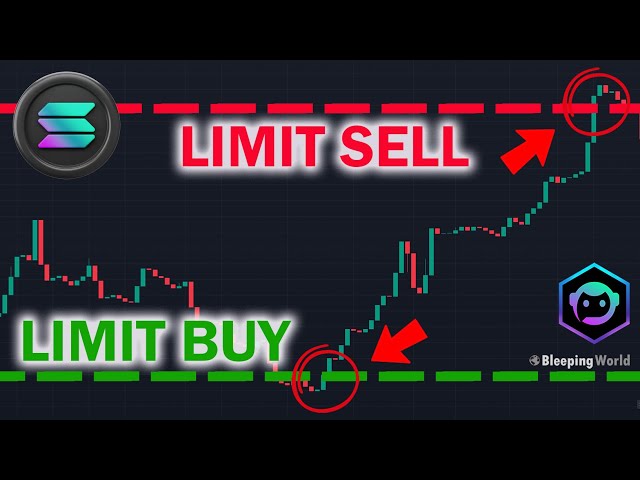
Conditional limits only activate when a separate condition is met. This is where trading bots provide functionality that on-chain limit orders cannot.
Examples of Conditional Triggers
- Volume trigger: Buy token X if 24h volume exceeds $500K (signals growing interest)
- Holder trigger: Buy if holder count crosses 1,000 (signals organic adoption)
- Market cap trigger: Sell if MC drops below $100K (signals dying momentum)
- Time trigger: Cancel all unfilled orders after 4 hours (prevents stale fills on outdated theses)
Bot-Based Conditional Limits
Trojan and Maestro Telegram bots support conditional orders with custom triggers. You can chain conditions — for example, buy only if volume is above X AND holder count is above Y.
Axiom provides conditional auto-buy features in its web interface, allowing you to set multiple conditions that must be satisfied before the order activates.
Strategy 5: Sell Ladders with Trailing Limits
This combines limit sell orders with dynamic adjustment based on price movement.
The Classic Sell Ladder
Set ascending limit sells to scale out of a winning position:
| Trigger | Sell % | Cumulative Sold |
|---|
| 2x | 20% | 20% |
| 5x | 20% | 40% |
| 10x | 20% | 60% |
| 20x | 20% | 80% |
| Moonbag | — | 20% held |
Adding a Trailing Component
Most Solana trading bots support trailing stop limits. The trailing stop follows the price up and only triggers if the price drops by a set percentage from its peak.
For example, set a trailing stop at 30% from the high. If the token reaches 15x, the stop sits at 10.5x. If it reaches 50x, the stop moves to 35x. You capture most of the upside while protecting against sudden dumps.
Axiom and Photon both support trailing stops that you can combine with fixed take-profit limits, giving you both a guaranteed profit-taking schedule and dynamic protection for the remaining position. For a dedicated walkthrough of these exits on memecoins specifically, see our guide to auto-sell strategies for Pump.fun tokens — take profit, trailing stop, and DCA out.
Common Mistakes to Avoid
Setting limits too tight. If you set a buy limit 0.5% below market on a volatile memecoin, you will rarely get fills on the exact tokens you want. Give your orders room to breathe — 5-10% below market is more realistic for active tokens.
Forgetting about locked capital. SOL locked in unfilled limit orders is SOL that cannot be used elsewhere. If you have 20 SOL in open orders across 15 different tokens, you are tying up significant capital on speculative fills.
Ignoring order expiry. On Jupiter, limit orders do not expire by default. A limit order you placed three weeks ago on a dead token can fill unexpectedly if someone manipulates the price to your level. Review and cancel stale orders regularly.
Not accounting for fees. Each limit order fill is a swap transaction with associated fees (platform fees, priority fees, and swap fees). If your limit orders are too small, fees can eat a meaningful percentage of the trade.
Final Thoughts
Limit orders on Solana have come a long way from the early days when market swaps were the only option. Tools like Jupiter, Photon, and Axiom now offer limit order functionality that rivals centralized exchanges, with the added benefit of self-custody.
The key is matching your limit order strategy to your trading style. If you are a memecoin trader doing quick flips, scaled entries and sell ladders will have the most impact. If you are accumulating larger positions in mid-cap DeFi tokens, TWAP and conditional orders will save you significant slippage.
Note: BullX suspended all trading on June 1, 2026, and has not relaunched. Photon and Axiom remain live alternatives with comparable limit order features.
Start with one strategy, practice it for a week, and measure the improvement in your average entry and exit prices. The data will speak for itself.
FAQ
Are limit orders on Solana truly on-chain?
It depends on the platform. Jupiter limit orders use an on-chain program that holds your tokens in escrow until the price condition is met. Trading terminals like Photon and Axiom typically use off-chain monitoring with on-chain execution — the bot watches the price and submits a swap transaction when your target is hit. Both approaches work, but on-chain orders are more censorship-resistant.
Can I set limit orders on brand-new Pump.fun tokens?
Yes, but with caveats. Most trading bots support limit orders on any token with an active pool. However, brand-new tokens have extremely low liquidity, which means your limit order might fill at a much worse effective price than expected due to slippage within the bonding curve mechanics.
How do Jupiter DCA orders handle failed transactions?
If a Jupiter DCA tranche fails due to slippage or network congestion, it retries on the next scheduled interval. Your total allocation does not decrease — the failed tranche amount rolls into subsequent executions. You can check the status of each tranche in the Jupiter DCA dashboard.
What happens to my SOL if I cancel a limit order?
Your SOL (or the token you placed the order with) is returned to your wallet immediately upon cancellation. On Jupiter, this requires a small transaction fee to close the on-chain order account. On trading bots, cancellation is usually instant since the funds were held in the bot's system rather than on-chain escrow.
Should I learn basic limit orders before trying these advanced strategies?
Yes. If you haven't placed a limit order on Jupiter before, start with our step-by-step guide to Jupiter limit orders, which walks through the basic buy-the-dip and take-profit setups, before moving on to scaled entries, TWAP execution, or pairing entries with our DCA on Solana guide for spreading purchases over time.