Solana Telegram Alerts Without Building a Bot
Most Solana traders already live in Telegram. The problem is getting the right signals there. You can build your own bot on an API, host it, keep it running and parse every transaction yourself. Or you can connect the official MadeOnSol bot, pick what you want to follow in a dashboard, and get alerts in your chat a few moments after we see the activity on-chain.
This guide covers the second option: MadeOnSol Telegram alerts. No code, no API key, no server.
Building your own Telegram bot on top of our data instead? That is a different product. See Solana data for Telegram bots for the API, webhooks and streams developers use.
What you can follow
All alerts are configured in the Telegram tab of your dashboard. Start from a preset, preview the message, save it and switch it on.
Wallet buys and sells (Pro and up)
Paste the wallets you want to watch and get a message when one of them buys or sells. It is the simplest way to follow a smart-money wallet you found on the KOL tracker or in your own research, without refreshing an explorer all day.
Deployer launches (Pro and up)
Pick deployers from the elite, good and rising tiers and get an alert the moment they launch a new token. Deployer Hunter explains how deployers are ranked by their track record. Deployer alerts also show that deployer's best earlier launch and its peak market cap, so you can judge the new token against their history at a glance.
Market-cap dip and recovery (Pro and up)
Choose a token, a drop percentage and an optional recovery from the lowest observed market cap. Useful for buying weakness on a token you already like, without watching the chart.
KOL consensus and first KOL buy (Ultra and up)
Get an alert when several tracked KOLs buy the same token inside your time window, or when a tracked KOL is the first to buy a token. You choose the number of distinct buyers, the window and a cooldown, and you can filter first buys by scout tier. These are observations of what KOLs did, not recommendations.
Every alert is built to act on
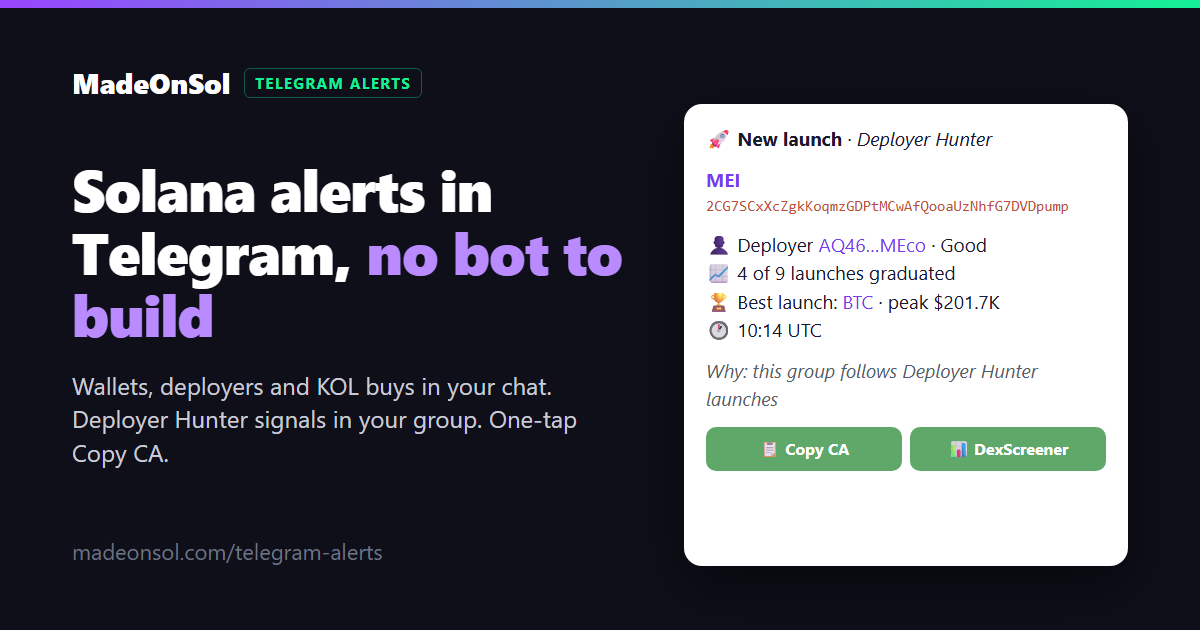
A notification is only useful if you can act on it fast. Each alert is laid out in short blocks:
- What happened, with the name of your rule
- Which token, with the full contract address on its own line
- The details: the wallet or deployer involved and the time in UTC
- Why you received it, plus links to the transaction or token on Solscan
Under every alert there is a Copy CA button. It copies exactly the token address shown in the message, never the wallet or the transaction, so you can paste it straight into your trading tool. A DexScreener button next to it opens the chart for the same token.
Share Deployer Hunter signals with your group
On Pro and up you can connect one public or private Telegram group that you administer. The group receives Deployer Hunter launches and graduations, in the same readable format with Copy CA, DexScreener and a View deployer button.
When a token that launched in your group later graduates, the graduation replies to the original launch message, so members can see the whole story in one thread.
On Ultra and up you can also:
- filter group signals by deployer tier, number of launches, number of graduations and recent bonding rate
- send launches and graduations to different topics in a forum group
- get one daily overview of recent signals, with a numbered Copy CA button per token
Your private wallet and KOL alerts always stay in your private chat. They are never posted to the group.
Quiet hours and control
Set quiet hours in your own time zone, for example from 23:00 to 07:00. Alerts that arrive in that window are not sent. You can pause all alerts with one click, edit a rule or delete it at any time, and the dashboard shows your recent deliveries.
The bot sends notifications only. It never places trades for you.
Which plan do you need?
Telegram alerts are included in paid MadeOnSol plans. There is no separate subscription.
| Pro | Ultra | Business |
|---|
| Alert rules | 5 | 25 | 100 |
| Wallets and deployers across rules | 15 | 100 | 500 |
| Wallet, deployer and market-cap alerts | Yes | Yes | Yes |
| KOL consensus and first KOL buy | No | Yes | Yes |
| Quiet hours | Yes | Yes | Yes |
| One group with Deployer Hunter signals | Yes | Yes | Yes |
| Group filters, topics and daily overview | No | Yes | Yes |
A free account can connect Telegram and send a test message, so you can set everything up before you upgrade. Live alerts start with Pro. See pricing for current prices and billing options.
How to start
- Open the Telegram tab in your dashboard and choose Connect Telegram.
- Telegram opens the MadeOnSol bot. Press Start. The setup link works for 10 minutes; the connection stays until you disconnect it.
- Pick a preset: follow a wallet, a deployer or KOL activity. Preview the message, save it and switch it on.
- Optional: open , choose and pick a group you administer. The bot confirms in the group.