Most Solana monitoring tutorials stop at token transfers. But the real power of on-chain analysis lies in tracking specific program activity -- understanding what instructions a program executed, which cross-program invocations (CPIs) it triggered, and what custom events it emitted.
Whether you are building a DEX analytics dashboard, monitoring a DeFi protocol for security, or detecting new liquidity pool creation in real-time, you need to go deeper than balance changes. This guide covers the tools and techniques for tracking Solana program activity at every level.
Why token transfers are not enough
A single Solana transaction can invoke multiple programs through CPI chains. When a user swaps on Jupiter, the transaction might touch Jupiter routing program, Raydium AMM, the SPL Token program, and the Associated Token Account program -- all in one atomic operation.
If you only watch token transfer events, you miss critical context:
- Which DEX program actually executed the swap
- What parameters were passed to the instruction (slippage, minimum output)
- Whether the instruction was a top-level call or an inner CPI
- Custom events emitted by the program (pool creation, oracle updates, liquidations)
To properly track Solana program activity, you need to monitor at the instruction level and understand CPI relationships.
Understanding Solana program instructions
Every Solana transaction contains one or more instructions. Each instruction targets a specific program and includes:
- Program ID: The on-chain address of the program being called
- Account keys: The accounts the instruction reads from or writes to
- Instruction data: A byte array encoding the function selector and arguments
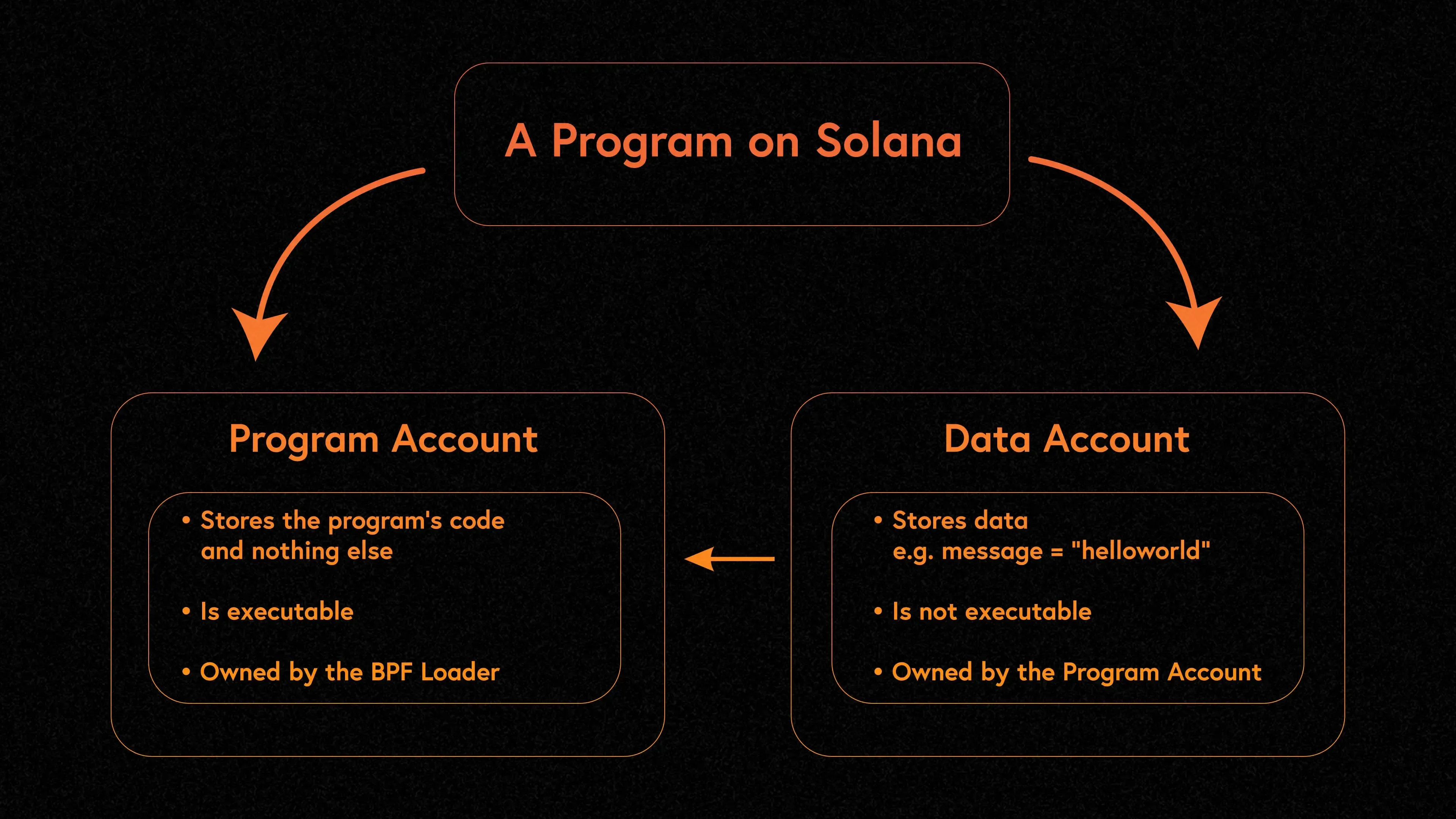
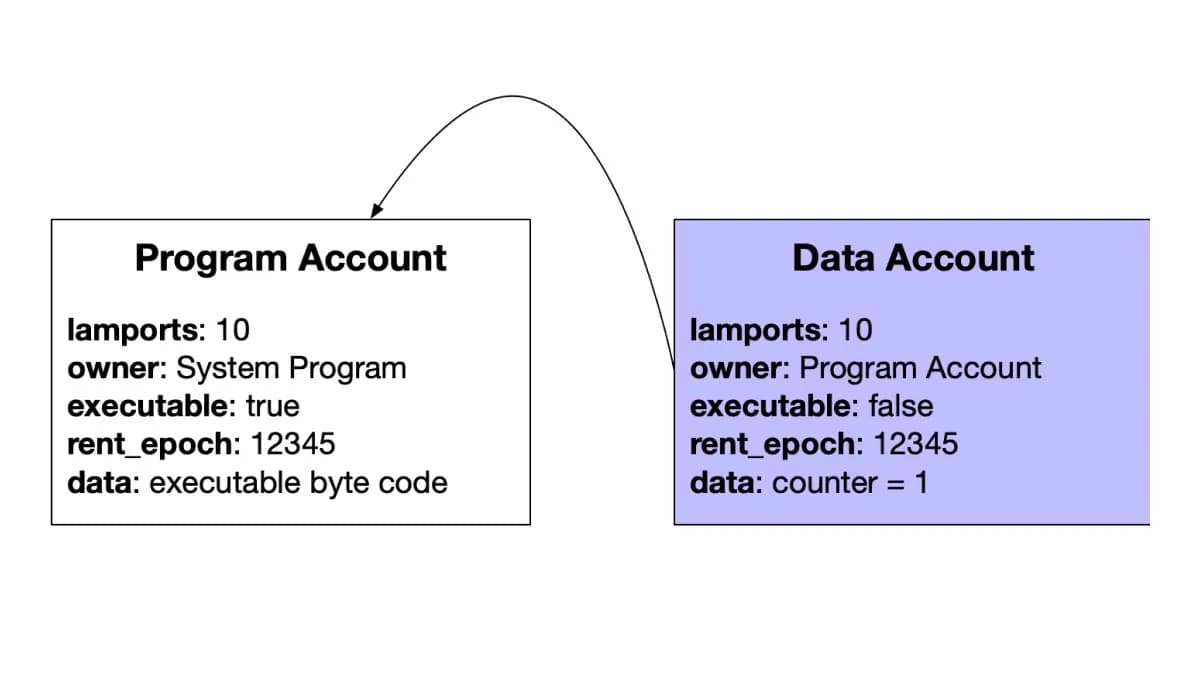
If the account model itself is new to you, our guide on Solana account data and how programs store state explains what lives in those account keys.
When a program calls another program during execution, that creates an inner instruction (CPI). The runtime records these in a tree structure, so you can trace exactly which program initiated each call.
// Structure of a parsed transaction with inner instructions
interface ParsedTransaction {
  transaction: {
    message: {
      instructions: CompiledInstruction[]; // Top-level instructions
    };
  };
  meta: {
    innerInstructions: {
      index: number;           // Which top-level instruction spawned these
      instructions: InnerInstruction[];  // The CPI calls
    }[];
    logMessages: string[];     // Program log output
  };
}
Subscribing to program logs in real-time
The simplest way to track Solana program activity is through WebSocket log subscriptions. The logsSubscribe RPC method lets you filter for transactions that involve a specific program.
import { Connection, PublicKey } from "@solana/web3.js";

const connection = new Connection("https://mainnet.helius-rpc.com/?api-key=YOUR_KEY");

const RAYDIUM_AMM = "675kPX9MHTjS2zt1qfr1NYHuzeLXfQM9H24wFSUt1Mp8";

const subscriptionId = connection.onLogs(
  new PublicKey(RAYDIUM_AMM),
  (logs, context) => {
    if (logs.err) return; // Skip failed transactions

    console.log("Signature:", logs.signature);
    console.log("Slot:", context.slot);

    // Parse log messages for program-specific events
    for (const log of logs.logs) {
      if (log.includes("ray_log:")) {
        // Raydium emits base64-encoded event data after "ray_log:"
        const eventData = log.split("ray_log: ")[1];
        const decoded = Buffer.from(eventData, "base64");
        console.log("Raydium event data:", decoded);
      }
    }
  },
  "confirmed"
);
This approach works well for moderate-volume programs but has limitations. Public RPC WebSocket connections are unreliable under load, and you only get log messages -- not the full parsed instruction data. For production workloads, consider gRPC streaming with a provider like Triton or Helius.
Decoding instructions with Anchor IDLs
Raw instruction data is just bytes. To understand what a program actually did, you need to decode those bytes using the program Interface Definition Language (IDL). Most Solana programs built with the Anchor framework publish their IDL on-chain.
import { Program, Idl } from "@coral-xyz/anchor";
import { Connection, PublicKey } from "@solana/web3.js";

const connection = new Connection("https://mainnet.helius-rpc.com/?api-key=YOUR_KEY");

// Fetch the IDL for an Anchor program
const programId = new PublicKey("PROGRAM_ID_HERE");
const idl = await Program.fetchIdl(programId, { connection });

if (!idl) {
  console.log("No IDL found -- program may not be Anchor-based");
  // Fall back to manual decoding (see next section)
}

// Create a Program instance for decoding
const program = new Program(idl, { connection });

// Decode an instruction from a transaction
function decodeInstruction(ix: { data: Buffer; programId: PublicKey }) {
  try {
    const decoded = program.coder.instruction.decode(ix.data);
    if (decoded) {
      console.log("Instruction name:", decoded.name);
      console.log("Arguments:", JSON.stringify(decoded.data, null, 2));
    }
    return decoded;
  } catch (err) {
    console.log("Failed to decode -- instruction may use a different format");
    return null;
  }
}
For programs that do not use Anchor, you need to decode instructions manually based on the program documentation or source code. The first 8 bytes of instruction data typically contain a discriminator (a hash of the instruction name), followed by serialized arguments.
Parsing custom program events
Anchor programs can emit structured events via the emit! macro. These events appear in transaction logs with a specific prefix that makes them identifiable and decodable.
import { BorshCoder, EventParser } from "@coral-xyz/anchor";

// Create an event parser from the program IDL
const coder = new BorshCoder(idl);
const eventParser = new EventParser(programId, coder);

// Parse events from transaction log messages
function parseEventsFromLogs(logs: string[]) {
  const events = [];

  const generator = eventParser.parseLogs(logs);
  for (const event of generator) {
    events.push({
      name: event.name,
      data: event.data,
    });
  }

  return events;
}

const tx = await connection.getTransaction(signature, {
  maxSupportedTransactionVersion: 1,
});

if (tx?.meta?.logMessages) {
  const events = parseEventsFromLogs(tx.meta.logMessages);
  for (const event of events) {
    console.log("Event:", event.name);
    console.log("Data:", event.data);
  }
}
Non-Anchor programs often use a simpler pattern: they write structured data to logs using msg! or sol_log_data. You can identify these by their program-specific prefixes (like the Raydium ray_log: prefix shown earlier).
Walking CPI chains: inner instructions
A single user action can trigger a cascade of cross-program invocations. Tracking the full CPI chain tells you the complete story of what happened in a transaction.
async function inspectCPIs(signature: string) {
  const tx = await connection.getTransaction(signature, {
    maxSupportedTransactionVersion: 1,
  });
  if (!tx?.meta) return;

  const accountKeys = tx.transaction.message.getAccountKeys();

  for (let i = 0; i < tx.transaction.message.compiledInstructions.length; i++) {
    const ix = tx.transaction.message.compiledInstructions[i];
    const programId = accountKeys.get(ix.programIdIndex)?.toBase58();
    console.log("Top-level program:", programId);

    // Find inner instructions (CPIs) spawned by this instruction
    const innerGroup = tx.meta.innerInstructions?.find((g) => g.index === i);
    if (innerGroup) {
      for (const inner of innerGroup.instructions) {
        const innerProgram = accountKeys.get(inner.programIdIndex)?.toBase58();
        console.log("  -> CPI:", innerProgram);
      }
    }
  }
}
For deeper analysis of transaction structures, check out How to Read Solana Transactions.