Reading Solana Account Data with TypeScript
Basic getAccountInfo
The most fundamental way to read account data is getAccountInfo:
import { Connection, PublicKey } from "@solana/web3.js";

const connection = new Connection("https://api.mainnet-beta.solana.com");
const accountPubkey = new PublicKey("TokenkegQfeZyiNwAJbNbGKPFXCWuBvf9Ss623VQ5DA");

const accountInfo = await connection.getAccountInfo(accountPubkey);

if (accountInfo) {
  console.log("Owner:", accountInfo.owner.toBase58());
  console.log("Lamports:", accountInfo.lamports);
  console.log("Data length:", accountInfo.data.length);
  console.log("Executable:", accountInfo.executable);
}
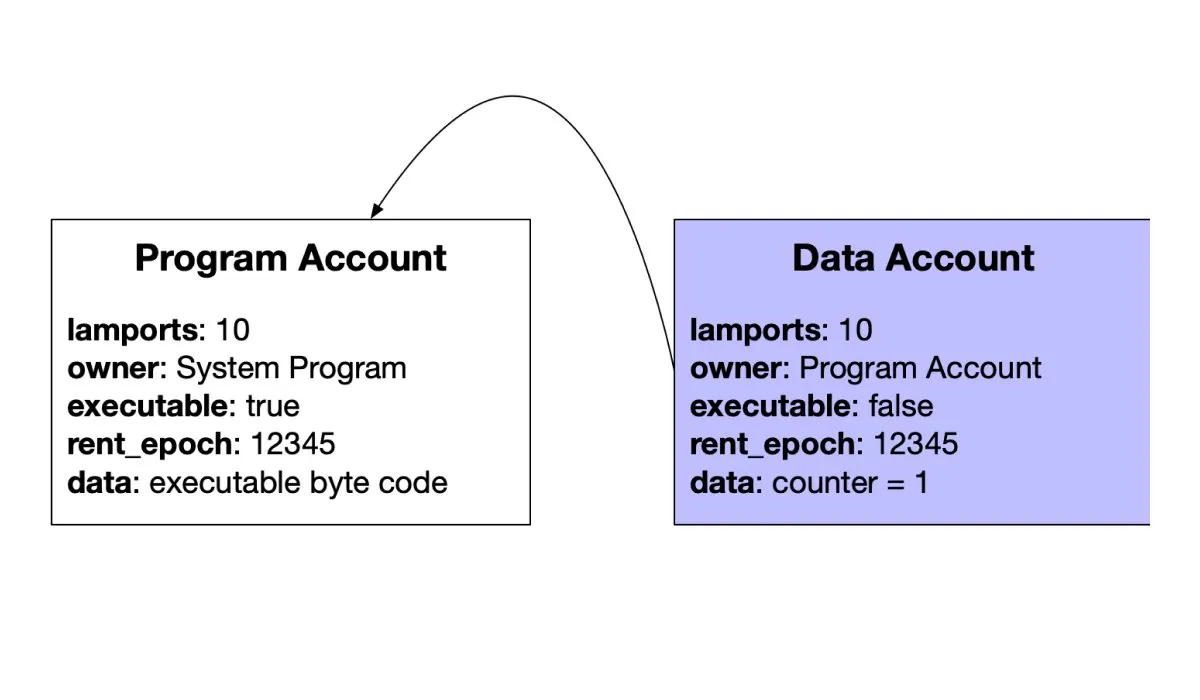
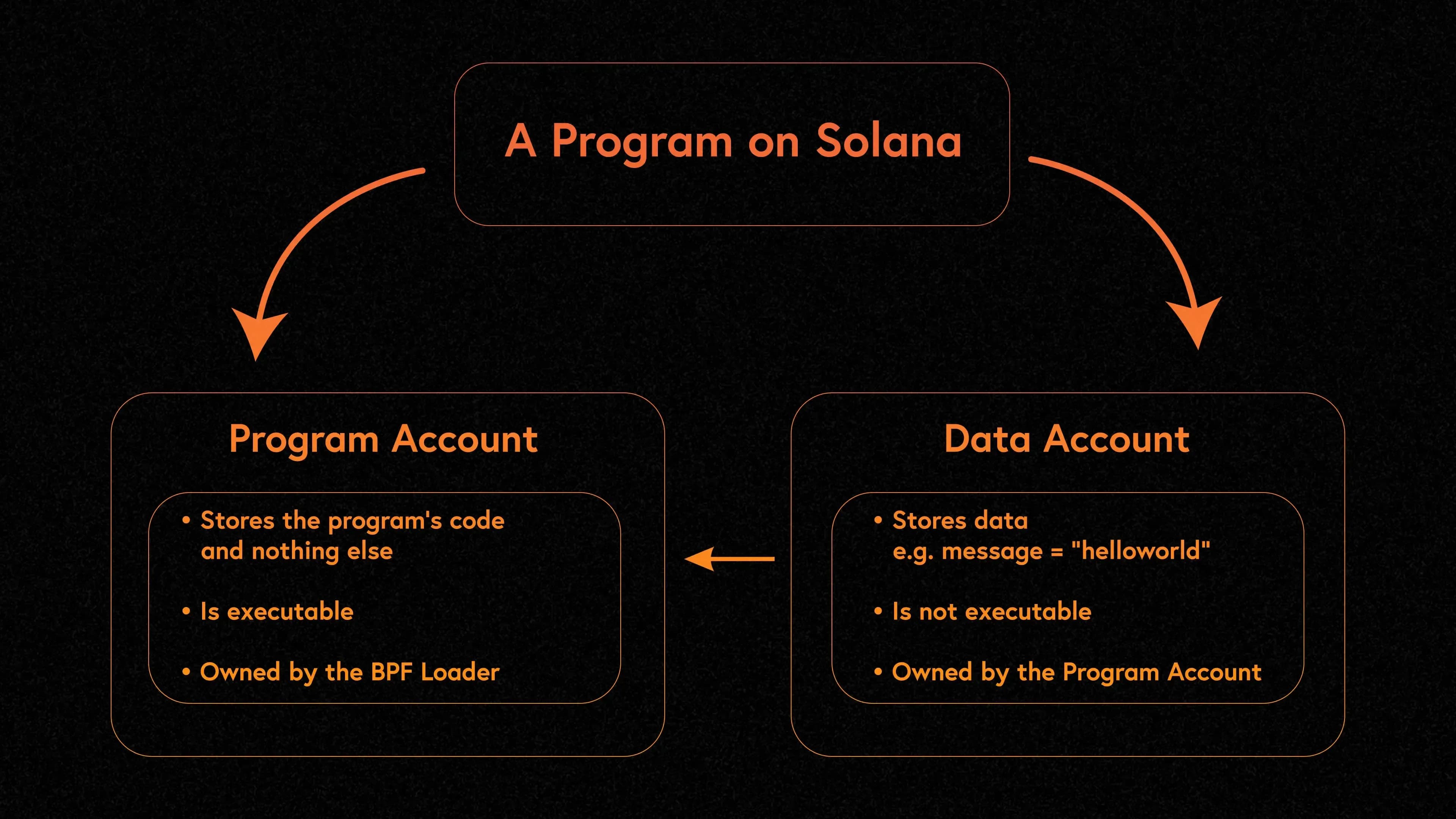
The returned accountInfo.data is a Buffer containing the raw bytes. To make sense of it, you need to know the account layout.
Deserializing an SPL Token Account
The SPL token library provides built-in deserialization:
import { Connection, PublicKey } from "@solana/web3.js";
import { getAccount, getMint } from "@solana/spl-token";

const connection = new Connection("https://api.mainnet-beta.solana.com");

// Read a token account
const tokenAccountPubkey = new PublicKey("YOUR_TOKEN_ACCOUNT_ADDRESS");
const tokenAccount = await getAccount(connection, tokenAccountPubkey);

console.log("Mint:", tokenAccount.mint.toBase58());
console.log("Owner:", tokenAccount.owner.toBase58());
console.log("Amount:", tokenAccount.amount.toString());

// Read the mint to get decimals
const mintInfo = await getMint(connection, tokenAccount.mint);
const uiAmount = Number(tokenAccount.amount) / Math.pow(10, mintInfo.decimals);
console.log("Human-readable balance:", uiAmount);
Manual Deserialization with Borsh
When working with custom program accounts, you often need to deserialize manually:
import { Connection, PublicKey } from "@solana/web3.js";
import { deserialize, Schema } from "borsh";

class GameState {
  player: Uint8Array;
  score: bigint;
  level: number;

  constructor(fields: { player: Uint8Array; score: bigint; level: number }) {
    this.player = fields.player;
    this.score = fields.score;
    this.level = fields.level;
  }
}

const schema: Schema = new Map([
  [
    GameState,
    {
      kind: "struct",
      fields: [
        ["player", [32]],
        ["score", "u64"],
        ["level", "u8"],
      ],
    },
  ],
]);

const connection = new Connection("https://api.mainnet-beta.solana.com");
const accountInfo = await connection.getAccountInfo(
  new PublicKey("ACCOUNT_ADDRESS")
);

if (accountInfo) {
  // Skip 8-byte Anchor discriminator if applicable
  const data = accountInfo.data.slice(8);
  const gameState = deserialize(schema, GameState, Buffer.from(data));
  console.log("Score:", gameState.score.toString());
  console.log("Level:", gameState.level);
}
Finding and Reading PDAs
Combining PDA derivation with account reading:
import { Connection, PublicKey } from "@solana/web3.js";

const PROGRAM_ID = new PublicKey("YOUR_PROGRAM_ID");
const connection = new Connection("https://api.mainnet-beta.solana.com");

// Derive the PDA
const [configPda] = PublicKey.findProgramAddressSync(
  [Buffer.from("global_config")],
  PROGRAM_ID
);

// Read the account
const accountInfo = await connection.getAccountInfo(configPda);

if (accountInfo) {
  console.log("Config account found at:", configPda.toBase58());
  console.log("Data length:", accountInfo.data.length, "bytes");
  console.log("Owner:", accountInfo.owner.toBase58());
  // Deserialize based on your program's schema
}
Why Solana Account Data Matters for Data Services
If you use APIs from providers like Helius or indexing platforms, the data you receive is ultimately derived from Solana account data. Understanding the account model helps you in several ways:
- Parse raw responses. Enhanced APIs return enriched data, but sometimes you need the raw account bytes -- especially for newer programs that indexers have not added custom parsers for.
- Debug transaction failures. When a transaction fails with "account data too small" or "invalid account owner," knowing the account model tells you exactly what went wrong.
- Build efficient queries.
getProgramAccounts lets you fetch all accounts owned by a specific program with optional filters on the data bytes -- but you need to know the byte offsets to filter effectively.
- Understand explorer output. When SolanaFM or Solscan shows you decoded account data, they are applying known schemas to raw bytes. For custom programs, you may need to decode the data yourself.
To watch a program's live activity rather than just its account state, our guide on how to track Solana program activity — instructions, events, and CPI chains covers monitoring what a program is actually doing in real time.
The getProgramAccounts call is particularly powerful for building dashboards and analytics tools:
const accounts = await connection.getProgramAccounts(programId, {
  filters: [
    { dataSize: 165 }, // Only accounts with exactly 165 bytes (token accounts)
    {
      memcmp: {
        offset: 32, // Owner field offset in token account layout
        bytes: walletAddress.toBase58(),
      },
    },
  ],
});

console.log("Found", accounts.length, "token accounts for wallet");
This is how wallets and portfolio trackers find all token balances for a given address -- by filtering token accounts where the owner field matches the wallet.
For more on reading and interpreting on-chain activity, see our guide to reading Solana transactions.
FAQ
What is the maximum size of a Solana account?
A Solana account can hold up to 10 MB of data, though accounts are typically much smaller. SPL token accounts are exactly 165 bytes, and most program data accounts range from a few hundred bytes to a few kilobytes. Larger accounts cost more in rent-exempt lamports, so developers are incentivized to keep account data compact. You can use realloc to resize accounts after creation, up to the 10 MB limit.
How do PDAs differ from regular Solana accounts?
Program Derived Addresses are accounts whose address is deterministically computed from a program ID and a set of seeds, rather than generated from a keypair. The key difference is that no private key exists for a PDA, so only the owning program can sign transactions on its behalf. This makes PDAs ideal for holding program-controlled funds and state. Programs use PDAs to create predictable, findable addresses for user-specific or global state without requiring the user to provide an account address.
Do I need to pay rent for Solana accounts?
All Solana accounts must maintain a minimum lamport balance to be rent-exempt, meaning they persist on-chain indefinitely. If an account falls below the rent-exempt threshold, the runtime will eventually deallocate it. The required balance depends on the account's data size -- roughly 0.00089 SOL per kilobyte. When creating accounts in your programs, you calculate this via getMinimumBalanceForRentExemption. For a full breakdown of rent costs and strategies to minimize them, see our Solana rent guide.
How can I view decoded account data without writing code?
Block explorers like SolanaFM and Solscan automatically decode account data for well-known programs including the Token Program, Token-2022, and popular DeFi protocols. Paste any account address into the explorer and it will show you the parsed fields. For Anchor programs, SolanaFM can decode accounts using the program's IDL (Interface Definition Language) if it has been published on-chain. For completely custom programs without a published IDL, you would need to deserialize the raw bytes yourself using the program's source code as reference.
How does Token-2022 change the account layout for tokens?
Token-2022 keeps the same five-field account structure described above, but its mints and token accounts can carry extra extension data appended after the base fields -- things like transfer-fee configs or confidential-transfer state. Our Token-2022 guide covers each of those extensions and how they build on the token account layout covered here.
How do I get notified the instant an account's data changes?
Polling getAccountInfo on a timer works for occasional checks, but it will always lag behind the chain and burns RPC credits at any real frequency. If you need every account data change the moment it happens, you want a Yellowstone Geyser plugin's update_account callback instead of repeated RPC calls -- see our guide to building a custom Solana Geyser plugin for the implementation details.